Sunday, 6 October 2013

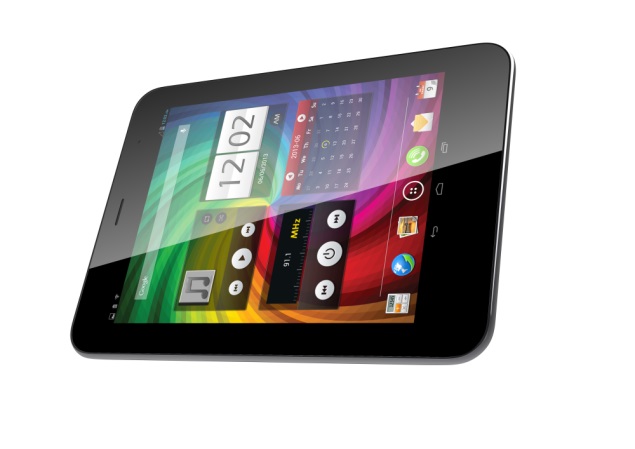
Micromax Canvas Tab P650 voice-calling tablet launched


Micromax has introduced its first flagship tablet in the Canvas series, calling it the Canvas Tab P650. Until now the domestic maker has been launching tablets under its Funbook portfolio. The new Canvas Tab has been launched and will be available in stores on Wednesday.
The Micromax Canvas Tab P650 comes with 8-inch IPS display (resolution unspecified) and is powered by a 1.2 GHz quad core processor alongside 1GB of RAM. It comes with 16GB of inbuilt storage which is further expandable up to 32GB via microSD card. It runs Android 4.2.1 Jelly Bean and is upgradable via FOTA (firmware over the air). The tablet sports a 5-megapixel autofocus rear camera while there is also a 2-megapixel front-facing camera onboard.
The Canvas Tab P650 comes with SIM support and has voice-calling, however, the company has not detailed if the device supports single SIM or is dual-SIM. Its 4800mAh battery is rated to deliver up to five hours of browsing time. Connectivity options on the tablet include Wi-Fi, Bluetooth, GPS and 3G. The tablet comes with some features initially introduced on the company's flagship smartphone, the Canvas 4, such as Video Pinning, Pop-up Browser, Look away to Pause video. Pre-loaded apps on the Canvas Tab include Spuul, M! Security, Music Hub and Opera Mini.
The Micromax Canvas Tab will be available in two colours, Blue and White.
Commenting on the launch, Rahul Sharma, Micromax Co- Founder said, "With today's launch, we aim to extend the Canvas experience to our users on the tablet PC's, supported by an entire eco-system of applications. The Canvas Tab promises a seamless experience to the consumers. The Canvas Tab will strengthen our leadership in the tablet PC market complemented with a 360 degree go to market strategy to reach out to the consumers."
Earlier on Wednesday, Micromax's budget tablet, the Funbook P255 went up for pre-orders through online retailers at Rs. 4,499.
Micromax Canvas Tab P650 key specifications
  • 8-inch IPS display
  • 1.2GHz quad core processor
  • 1GB of RAM
  • 16GB of built-in storage, expandable up to 32GB
  • 5-megapixel rear camera
  • 2-megapixel front-facing camera
  • Android 4.2.1 Jelly Bean and upgradable via FOTA
  • 4800 mAh battery

AVAILABLE @ getsuccessmmx.blogspot.in

Price   :  16k*

BBM to come pre-loaded on Micromax Canvas smartphones from October


Amidst the news that BlackBerry Messenger will be available for Android and iPhone users this weekend, Micromax has announced that BBM will come bundled with its Canvas range of smartphones from October.
The domestic handset maker notes that the popular BlackBerry Messenger instant chat application will come pre-loaded on its new Canvas smartphones from the first week of October. For the existing Canvas users BBM for Android app can be downloaded from the Google Play store, notes the company.
As reported earlier, BlackBerry's popular messaging chat app will be available for rival devices using Google's Android and for Apple's iPhone starting this weekend. The BBM app will reportedly be free for download for Android based smartphones running Ice Cream Sandwich and Jelly Bean (Android 4.x) starting September 21 while BBM for iPhones running iOS 6 and iOS 7 will be available for download from App Store starting September 22. However, BlackBerry has not specified the pricing of the BBM app for iPhone users, yet.
Commenting on the announcement, Deepak Mehrotra, CEO, Micromax said, "Bringing one of the most popular mobile messaging services with BBM on our smartphones is yet another effort to expand our bouquet of messaging services for our consumers to connect and communicate seamlessly with their loved ones."
Sunil Lalvani, Managing Director for India at BlackBerry commented on the rollout, "We are delighted to work with Micromax to bring BBM to their customers directly on Canvas smartphones across India."
With the official rollout of BlackBerry's instant messaging app on Android and iOS just around the corner, it will be interesting to see how BBM stacks up against a host of third party apps that include popular WhatsApp, Nimbuzz, WeChat and Hike.


NEWS GATHER BY
getsuccessmmx.blogspot.in

Micromax, Aircel announce strategic partnership, bundled offers


MICROMAX the domestic handset manufacturer, and telecom operator Aircel have announced a strategic partnership to share their channel and retail networks, along with sales resources. The companies will also kick-start an integrated device sales activation program in the country. Both the companies have also announced reverse bundling handset offers worth Rs. 12,000 per month for a new Aircel customer using a Micromax device.
Under the new strategic partnership, Aircel has announced bundled offers for Micromax devices which include special calling benefits, data and dongles packs.
For instance, an Aircel subscriber using Micromax smartphones will now get local calling on the both 2G and 3G networks at 1paise per 2 seconds while the STD tariffs are cut-down to 1 paisa per second for initial three months. For data usage, an Aircel subscriber will get free 2GB per month data limit which again for first three months. Moreover, consumers using Micromax's dongle on Aircel network will get 500MB of free data per month for three months.
Commenting on the partnership, Anupam Vasudev, Chief Marketing Officer, Aircel, said, "Aircel recognizes the importance of smartphone devices to drive data usage. In line with that, it is our focus to get into partnerships with leading smartphone device manufacturers in an endeavor to bring to our customers exciting bundled products. In this exclusive partnership with Micromax, we will share their robust channel and retail network to deliver innovative and best value for money products and services."
Micromax's co-founder, Vikas Jain said, "We are very happy to partner with Aircel, as this partnership will be an excellent amalgamation of Aircel's innovative offerings in the market place and superior hardware capabilities of Micromax, which will enable millions of consumers in India to enjoy seamless connectivity through affordable call rates, data usage and internet TV on Micromax devices."

Micromax, Aircel in strategic partnership to drive data growth


New Delhi: Telecom operator Aircel and domestic smartphone maker Micromax have entered into a strategic partnership where they will share their retail networks, sales resources and run an integrated device sales activation programme to drive data usage.

Under the pact, Micromax handsets would come with a bundled offer of low call rates, free internet usage and contents like videos, songs, games for the first three months from Aircel.

"Our objective is to churn customers from other networks under this offer. In the last two months, we have been leading market in terms of new customer acquisition. We expect to acquire 4-5 lakh device users every month from this arrangement," Anupam Vasudev, chief marketing officer of Aircel, said while announcing the agreement.

Aircel will charge local calls at the rate of 1 paisa for every 2 seconds and STD calls at the rate of 1 paisa per second from new customers of Micromax devices.

Micromax 3G smartphone buyers will get internet usage of 2GB a month for the first three months, while for buyers of Micromax's 2G phones, internet usage would be limited to 1 GB on 2G and 3G network.

"We will offer free 3G data services to customers only in 13 circles where we have 3G networks for rest it will be 2G network. In 3G circles, we will also offer free 3G data speed from 6 am to 9 am for customers experience 3G services," said Sunil K, vice president of data and devices at Aircel.

"Average 3G data usage per month in 650 MB but we are giving 2GB data on 3G network which is more than three times than the average consumption," he said.

In addition, Micromax phone buyers will get content like videos, songs and access to an internet TV application, Popcorn TV, worth Rs. 10,000 free during the promotion period.

"The idea is to create long terms traction, bring in experience in to the play. From here on, device becomes an automatic choice for the customer. The SIM card or the connectivity becomes the default choice of customer," said Vikas Jainm, Micromax's business director.

Micromax customers would not have to buy any recharge to activate these services as Aircel's system will automatically identify a new device once a SIM in placed in it, while the offers will be transferred on to the customer's connection.

Buyers of Micromax 3G dongle's will also get 500 MB of internet usage free for three months.

Micromax Funbook Mini tablet with voice-calling


The Canvas Tab P650 runs Android 4.2.1 Jelly Bean and is upgradable via FOTA (firmware over the air). The tablet sports a 5-megapixel autofocus rear camera while there is also a 2-megapixel front-facing camera onboard. The Canvas Tab P650 comes with SIM support and has voice-calling, however, the company has not detailed if the device supports single SIM or is dual-SIM.
Micromax Funbook Mini tablet key specifications
  • 7-inch LCD display with 1024x600 pixels resolution
  • 1GHz dual-core processor
  • 1GB of RAM
  • 4GB of built-in storage, expandable up to 32GB
  • 2-megapixel rear camera
  • 0.3-megapixel front-facing camera
  • Android 4.1 Jelly Bean
  • 2800 mAh battery
  • Dual-SIM (GSM+GSM)

PRICE : getsuccessmmx.blogspot.in
 

கம்ப்யூட்டரில் ஃபங்சன் கீ பயன்பாடு KEY'S FEATURES OF F1- F12

கம்ப்யூட்டரில் எண் வரிசை விசைகளுக்கு மேலே இருப்பது ஃபங்சன் கீ வரிசை. இதில் பெரும்பாலும் நாம் பயன்படுத்தும் இரண்டு விசைகள் F1 மற்றும் F5.

இணையத்தைப் பயன்படுத்தும்போது மட்டும் பெரும்பாலும் F5 விசையை மட்டும் பயன்படுத்துவோம். இது வலைப்பக்கத்தை மீள் தொடக்கம் (Refresh) செய்வதற்குப் பயன்படும்.

மற்ற விசைகளும் இதைப்போன்று பயன்மிக்க பயன்பாடுகளைக் கொண்டதுதான்.

 ஒவ்வொரு விசையும் எதற்கு எதற்கு பயன்படுகிறது என்பதை தெரிந்துகொண்டால் மிகவும் பயன்மிக்கதாக இருக்கும். எதையும் தொடர்ந்து பயன்படுத்த ஆரம்பித்தால் அதுவே பழக்கமாகிவிடும்.

பிறகு உங்களுக்கும் விரைவாக பிரௌசிங் செய்வது, விரைவாக கணினியைக் கையாள்வது எளிமையாகிவிடும்.

F1 விசை பயன்பாடு:

அனைத்து புரோகிராம்களிலும் இது உதவிகுறிப்பு பக்கத்தைத் திறக்கப் பயன்படுகிறது. அதாவது நீங்கள் எந்த புரோகிராமை பயன்படுத்திக்கொண்டிருக்கிறீர்களோ அந்த புரோகிராம் பற்றிய உதவிக்குறிப்புகளைப் பெறலாம். (உதாரணமாக போட்டோஷாப் மென்பொருளைப் பயன்படுத்திக்கொண்டிருக்கும்பொழுது, அதைப்பற்றி உதவிக்குறிப்புகளைப் பெற F1 விசையை அழுத்திப் பெறலாம். போட்டோஷாப் மட்டும் அல்ல.. கணினியில் உள்ள அனைத்து புரோகிராம்களுக்கும் உதவிக்குறிப்புகளைப் பெற இந்த F1 விசைப் பயன்படுகிறது.)
CMOS செட்டப்பில் பயன்படுகிறது.


F2 விசை பயன்பாடு:

ஒரு கோப்பு அல்லது ஒரு கோப்புறைக்கு "மாற்றுப்பெயர்" (Rename) கொடுக்கப் பயன்படுகிறது. Boot menu செல்ல பயன்படுகிறது.
மைக்ரோசாப்ட் வேர்டில்..
புதிய டாகுமெண்ட் ஒன்றை திறக்கப் (Alt+Ctrl+F2)பயன்படுகிறது
Print Preview பார்க்க (Ctrl+F2) பயன்படுகிறது.

F3 விசை பயன்பாடு:

பெரும்பாலான புரோகிராமில் தேடுதல் வசதியை (Search) கொண்டு வர பயன்படுகிறது.
மைக்ரோசாப்ட் வேர்ட் டாகுமெண்டில் தேர்ந்தெடுக்கப்பட்ட வார்த்தையை பெரிய எழுத்திலிருந்து சிறிய எழுத்தாக (Upper case to Lower case) மாற்ற பயன்படுகிறது.
MS-DOS லும் இறுதிய வரியை ரிப்பீட் (Repeat)செய்ய பயன்படுகிறது.

F4 விசையின் பயன்பாடு:

புரோகிராமில் உள்ளதை Find செய்யப் பயன்படும் திரையை கொண்டுவர பயன்படுகிறது.
மைக்ரோசாப்ட் எம்எஸ் வேர்ட் டாகுமெண்டில் முந்தைய வரி ஒன்றை பேஸ்ட் செய்ய பயன்படுகிறது.
ஒரு புரோகிராமை மூட பயன்படுகிறது. (Alt+F4)
தற்பொழுது காட்சித்திரையில் தோற்றமளிக்கும் புரோகிராமை (Current Window) மூட (Ctrl+F4)பயன்படுகிறது.

F5 விசையின் பயன்பாடு:

கணினியை அல்லது இணையப்பக்கத்தை மீள்தொடக்கம் (Reload அல்லது Refresh)செய்ய பயன்படுகிறது.
மைக்ரோசாப்ட் வேர்டில் Find and Replace விண்டோவைத் திறக்கப் பயன்படுகிறது.
பவர்பாய்ண்ட் பிரசன்ட்டேசனை இயக்கப் பயன்படுகிறது.

F6 விசையின் பயன்பாடு:

கூகிள் குரோம்,இன்டர்நெட் எக்ஸ்புளோரர், பயர்பாக்ஸ் போன்ற உலவிகளில் கர்சரை அட்ரஸ்பாருக்கு கொண்டுசெல்ல பயன்படுகிறது.
மைக்ரோசாப்ட் வேர்டில் புதிய டாகுமெண்ட்டைத் திறக்க பயன்படுகிறது. (Ctrl+Shift+F6)

F7 விசையின் பயன்பாடு:

மைக்ரோசாப்ட் வேர்ட் டாகுமெண்டில் Spelling check மற்றும் Grammer Check செய்யப் பயன்படுகிறது.
மொசில்லா பயர்பாக்சில் Caret Brwosing பயன்பாட்டைத் திறக்கப் பயன்படுகிறது.

F8 விசை பயன்பாடு:

விண்டோஸ் கணினி தொடக்கம் செய்யும்போது Safe Mode ல் திறக்கப் பயன்படுகிறது.

F9 விசை பயன்பாடு:

Quark 5.0 வில் மெசர்மெண்ட் டூல்பார் திறக்கப் பயன்படுகிறது.
F10 விசையின் பயன்பாடு:

மைக்ரோசாப்ட் வேர்டில் "MenuBar" திறக்கப் பயன்படுகிறது.
மௌசில் ரைட் கிளிக் பயன்பாட்டைக் கொண்டுவர பயன்படுகிறது (Shift+F10)

F11 விசையின் பயன்பாடு:
கணனியில் முழுதிரையை (Full Screen)கொண்டுவர பயன்படுகிறது.

F12 விசையின் பயன்பாடு:

மைக்ரோசாப்ட் வேர்டில் Save As Menu கொண்டுவர பயன்படுகிறது.
மைக்ரோசாப்ட் வேர்ட் டாகுமெண்ட்டை சேமிக்க பயன்படுகிறது (Shift+F12)
மைக்ரோசாப்ட் வேர்ட் டாகுமெண்ட்டை பிரிண்ட் செய்ய பயன்படுகிறது. (Ctrl+Shift+F12)

usb மூலம் உங்கள் கணணியை லாக் செய்ய


நீங்கள் அன்றாடம் பயன்படுத்தும் ஒரு USB பென்டிரைவ் மூலம் இதைச் செய்யலாம். பென்டிரைவ் என்பது கோப்புகளை சேமிக்கப் பயன்படும் ஒரு Removable Device. அதையே சாவியாக பயன்படுத்த முடியும்

இதற்கென இணையத்தில் ஒரு புரோகிராம் இருக்கிறது. அந்த புரோகிராமிற்கு பெயர் பிரிடேட்டர் (Predator). இது முற்றிலும் இலவசமான புரோகிராம். இனி உங்களிடம் உள்ள பென்டிரைவை, கம்ப்யூட்டரில் உள்ள USB போர்ட்டில் செருகினால் மட்டுமே உங்களுடைய கம்ப்யூட்டர் பயன்படுத்த முடியும்.

மற்றவர்கள் பயன்படுத்தவே முடியாது. அப்படியே பயன்படுத்த நினைத்தாலும் அக்சஸ் டினின்ட் (Access denied )அதிலிருந்து எடுத்துவிட்டால் கம்ப்யூட்டரைப் பயன்படுத்த முடியாது?

இந்த புரோகிராமை பயன்படுத்தி உங்களுடை பிளாஷ் டிரைவை எப்படி கம்ப்யூட்டர் திறவுகோலாகப் பயன்படுத்துவது என்று பார்ப்போம்.

1. Predator என்று கூகிளில் தேடி இந்த புரோகிராமை உங்கள் கம்ப்யூட்டரில் இன்ஸ்டால் செய்துகொள்ளுங்கள்.

2. பிரிடேட்டர் மென்பொருள் இயங்கத்தொடங்கியவுடன், உங்களுடைய பென்டிரைவை கம்ப்யூட்டரில் இணைக்கவும்.

3. இணைத்தவுடன் ஒரு டயலாக்ஸ் பாக்ஸ் கிடைக்கும். பாஸ்வேர்ட் அமைத்திட கேட்கும். OK கொடுக்கவும்.

4. அடுத்து Preferences என்ற ஒரு விண்டோ கிடைக்கும். அதில் New Password என்றிருப்பதில் நீங்கள் மட்டும் தெரிந்துகொள்ளக்கூடிய வித்தியாசமான பாஸ்வேர்ட் ஒன்றை கொடுக்கவும்.

5. அடுத்துள்ள ஆல்வேஸ் ரெக்கொயர்ட் (Always Required) என்ற வாசகம் உள்ளதில் டிக் மார்க் ஏற்படுத்துங்கள். (இந்த செட்டிங்கானது நீங்கள் ஒவ்வொரு முறையும் கம்ப்யூட்டரில் பிளாஷ் டிரைவை செருகும்போதும் கம்ப்யூட்டர் பாஸ்வேர்ட் கேட்பதற்காக.)

6. அடுத்துள்ள ஃப்ளாஸ் டிரைவ் என்ற பிரிவில் உங்களுடைய பிளாஸ் டிரைவினைத் தேர்ந்தெடுக்கவும்.

7. இறுதியாக கிரியேட் கீ — Create key என்பதை அழுத்தி ஓ.கே கொடுத்து வெறியேறவும்.

அவ்வளவுதான் முடிந்தது. பிரிகேட்டர் புரோகிராமினை நீங்கள் சரியாக செட் செய்துவிட்டீர்கள். இப்பொழுது டாஸ்க் பாரில் பார்த்தால் பிரிகேட்டர் புரோகிராமின் ஐகான் இருக்கும். அதை அழுத்தினால் ஒரு சில வினாடிகளில் அந்த ஐகான் ஆனது பச்சை நிறத்தில் ஒளிர ஆரம்பிக்கும். பச்சை நிறமாக மாறியதும் பிரிகேட்டர் புரோகிராம் இயங்கத் தொடங்கிவிட்டது என்று புரிந்துகொள்ளுங்கள்.


30 வினாடிகளுக்கு ஒரு முறை பிரிகேட்டர் புரோகிராம் ஃப்ளாஷ் டிரைவ் கம்ப்யூட்டரில் இணைக்கப்பட்டுள்ளதா என சோதனையிடும். இணைப்படவில்லை என்றால் உங்களுடைய கம்ப்யூட்டரின் திரையின் வெளிச்சம் குறைந்து இயக்கம் நின்றுவிடும். இப்புரோகிராமின் இயக்கத்தை தற்காலிகமாக நிறுத்த டாஸ்க் பாரில் பாஸ் மானிட்டரிங் என்பதனைத் தேர்ந்தெடுக்கவும்.

உங்கள் Computer log செய்து இருக்கும்போது யாராவது பயன்படுத்த முயற்சி செய்தால் அதனை நீங்கள் கம்ப்யூட்டர் இயக்குகையில் டாஸ்க் பார் மெனுவில் உள்ள வியூ லாக் (View Log) மூலம் தெரிந்துகொள்ள முடியும்.

நீங்கள் உங்களுடைய கம்ப்யூட்டரில் பணிபுரிந்து முடிக்கும் வரை பென்டிரைவயும் USB Port -ல் இணைந்திருக்க வேண்டும்

இதற்காகவே ஒரு USB Drive வை நீங்கள் தனியாக பயன்படுத்த வேண்டும். அந்த யூ.எஸ்.பி. டிரைவ்தான் உங்கள் கம்ப்யூட்டருக்கு சாவி.
ஒவ்வொரு முறையும் கம்ப்யூட்டரை இயக்க விட்டு, இந்த சாவியை செருகினால்தான் கம்ப்யூட்டர் திறக்கும்.

ஒன்றுக்கும் மேற்பட்ட USB Port-கள் உங்கள் கணினியில் இருக்குமாறு பார்த்துக்கொள்ளுங்கள். இந்த சாவி செருகியிருக்கும்போது வேறு ஏதேனும் யூ.எஸ்.பி. டிரைவில் பைல் சேமிக்க வேண்டுமெனில் மாற்று யூ.எஸ்.பி போர்ட் கண்டிப்பாக உங்கள் கம்ப்யூட்டரில் இருக்க வேண்டும்.
முக்கியமான குறிப்பு: பிரிகேட்டர் புரோகிராம் மூலம் செட் செய்த யூஸ்.எஸ்.பி டிரைவை கம்ப்யூட்டரிலிருந்து நீக்கினால் உங்களுடைய கம்ப்யூட்டர் இயக்கத்தை நிறுத்திவிடும் என்பதை மட்டும் நன்றாக நினைவில் வைத்துக்கொள்ளுங்கள்…!